
Can you get nutrition info from a YouTube recipe? Yes — but not from YouTube itself.
YouTube is a video platform. It doesn’t know what’s in the recipes its creators make, and it doesn’t calculate calories or macros. That information lives in the ingredients, quantities, and servings — not in the video.
To get nutrition info from a YouTube recipe, you first need to extract the recipe — the actual ingredients and quantities — and then calculate from there. ChefScribe does both steps automatically.
Why YouTube videos don’t include nutrition information
Most cooking creators aren’t nutritionists, and YouTube gives them no tools to add structured nutrition data to their videos. There’s no calorie field, no macro breakdown, no serving-size input.
Even when a creator includes the recipe in the description, it’s usually just a text list — no nutritional analysis attached. This is part of a broader problem: YouTube recipes are hard to use in the kitchen for exactly this reason — practical details like quantities, timing, and nutrition are either buried in the video or missing entirely.
That’s not a criticism of creators. Cooking videos are made to show you how a dish comes together: the technique, the texture, the timing. Nutrition tracking is a different job entirely, and one the video format isn’t built for.
How ChefScribe gets you the nutrition info
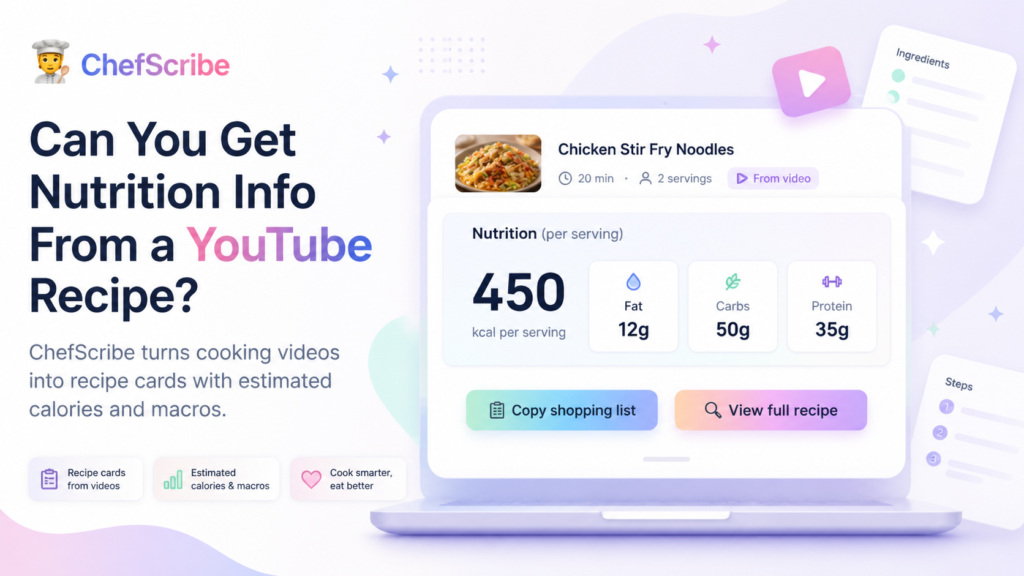
ChefScribe extracts the recipe from the YouTube video — ingredients, quantities, and serving size — and uses that structured data to generate a nutrition estimate per serving.
A typical recipe card includes:
- Calories per serving
- Fat (g)
- Carbohydrates (g)
- Protein (g)
So a video for chicken stir fry noodles that mentions chicken breast, noodles, soy sauce, sesame oil, and vegetables becomes a recipe card you can actually read — and a nutrition breakdown you can actually use.
→ See a live example recipe card
How accurate is it?
The nutrition figures are estimates, and it’s worth being clear about what that means.
A YouTube recipe might say “a splash of oil” or “a handful of cheese.” Exact quantities aren’t always stated, brands vary, and whether you eat all the sauce or leave some in the pan makes a difference. ChefScribe works with the information the video provides — which is usually enough for a useful ballpark, but not a clinical measurement.
For most home cooks, that’s exactly what’s needed. You’re not asking whether this meal has 447 or 453 calories. You’re asking whether it’s a light dinner or a heavy one, whether it’s protein-forward, whether it fits roughly into your week.
Estimated nutrition is fine for that.
If you’re tracking macros precisely for medical reasons, managing a condition like diabetes or kidney disease, or working with a dietitian on a specific plan, cross-check the ingredients using a dedicated nutrition tool with the exact brands and quantities you’re using.
When nutrition info from YouTube recipes is genuinely useful
Even as an estimate, knowing the rough nutritional shape of a recipe changes how you plan your cooking.
Comparing recipes. Two pasta dishes might look similar on screen. One is 380 kcal per serving with 30g protein. The other is 680 kcal with 14g protein. That’s useful to know before you decide which one to make on a Tuesday night.
Planning a higher-protein week. Once recipes are saved to your library, you can organise them and scan by protein content to pick meals that hit your targets without manually calculating anything.
Understanding what you’re actually eating. A recipe described as “light” by its creator might include more oil or coconut milk than expected. The nutrition breakdown makes that visible.
Adjusting serving sizes. If ChefScribe shows a recipe serves 4 at 520 kcal each and you’re cooking for 2, you know to halve the quantities — and what that means for the plate.
Does getting the nutrition info mean skipping the video?
No — and it shouldn’t.
The creator still deserves the view and the credit. ChefScribe recipe cards link back to the original YouTube video, and you should still watch for technique: how the sauce should look, when to pull the chicken off the heat, how thinly the garlic should be sliced.
The recipe card does the practical work at the hob — you can even print it out if you’d rather not have a screen in the kitchen. The video does the teaching. They’re better together.
So if you’re wondering can you get nutrition info from a YouTube recipe, the answer is yes — as an estimate, once the recipe has been extracted into ingredients, quantities, and servings.
FAQ
Can I get calorie information from a YouTube cooking video?
Not directly from YouTube — but you can extract the recipe using ChefScribe, which then generates a calorie estimate per serving based on the ingredients and quantities in the video.
Is the nutrition info from ChefScribe accurate?
It’s an estimate based on the ingredients stated in the video. It’s useful for general meal planning but shouldn’t be relied on for medical nutrition management.
What nutrition details does ChefScribe show?
Calories, fat, carbohydrates, and protein per serving — the four figures most home cooks want when checking a recipe.
Does ChefScribe work on videos that don’t have a written recipe in the description?
Yes. ChefScribe reads the video audio, not just the description, so it can extract a recipe from videos where the creator never included one in writing.
The short answer
YouTube recipes don’t come with nutrition info built in. ChefScribe extracts the recipe and generates an estimate so you don’t have to do the maths yourself.
It takes a few seconds. The result is a recipe card with ingredients, steps, serving size, and a nutrition breakdown — ready to use whether you’re cooking tonight or planning the week ahead.
👉 Install ChefScribe free from the Chrome Web Store
Related guides:
How to print a recipe from a YouTube video
How to get a recipe from a Youtube video
