
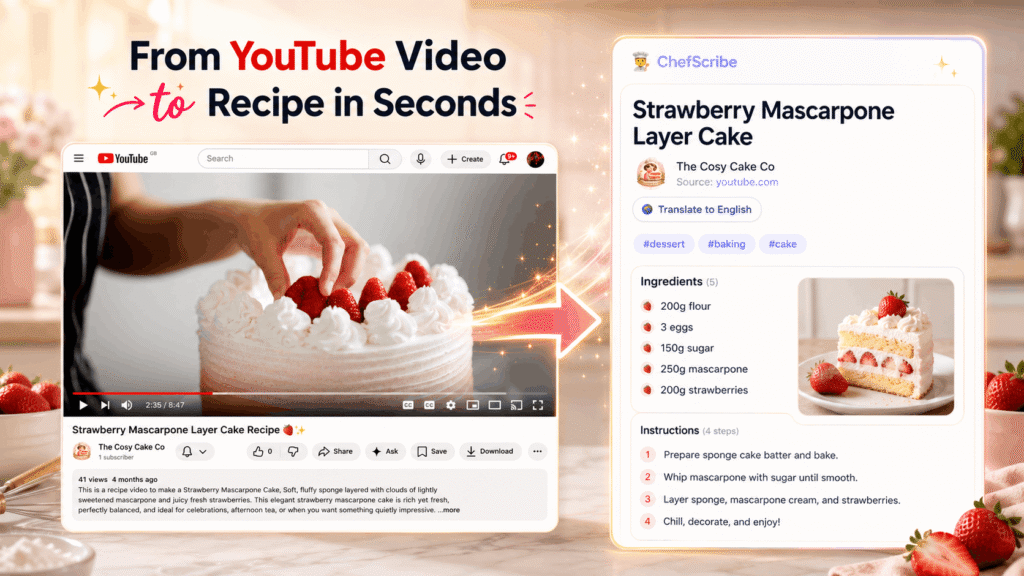
You find the perfect recipe on YouTube.
The food looks amazing. The creator makes it look easy. You are ready to cook.
Then the chaos begins.
You pause the video. Rewind ten seconds. Miss the measurement. Pause again. Your hands are covered in flour, your phone screen looks like it has survived a small kitchen war, and somehow the video jumps back to the intro just when you need to know how much garlic to add.
YouTube is brilliant for discovering recipes.
But it is not always brilliant when you are standing at the hob trying to cook from one.
The good news is that you can extract a recipe from a YouTube video and turn it into a clean written recipe card with ingredients, steps, timings, servings, notes and a link back to the original video.
In this guide, we’ll look at the best ways to get a recipe from a YouTube video, including using a YouTube recipe extractor, checking the video description, using the YouTube transcript with AI, and writing the recipe out manually.
For the dedicated landing page, see YouTube to recipe card — it explains how ChefScribe turns YouTube cooking videos into clean recipe cards with ingredients and steps.
If you want the fastest option, ChefScribe turns YouTube cooking videos into clean recipe cards in seconds.
👉 Try ChefScribe free — extract 6 YouTube recipes every month
Can you extract a recipe from a YouTube video?
Yes. You can extract a recipe from a YouTube video by pulling out the ingredients, quantities, cooking steps and useful notes, then organising them into a clear written recipe card.
A useful YouTube recipe card should include:
- A clear ingredient list
- Measurements and quantities where available
- Numbered cooking steps
- Prep time
- Cook time
- Total time
- Serving size
- Notes or tips from the video
- Nutrition information if enough detail is available
- A link back to the original YouTube video
That matters because a written recipe is much easier to cook from than a video timeline.
You can glance at the next step, check a quantity, see what comes next, and keep cooking without constantly pausing, rewinding or trying to wake your phone screen with doughy fingers.
The fastest way: use a YouTube recipe extractor
The quickest way to extract a recipe from a YouTube video is to use a YouTube recipe extractor.
ChefScribe is a Chrome extension that turns YouTube cooking videos into clean recipe cards. It extracts the recipe information from the video and creates a structured card with ingredients, steps, timings, serving details and estimated nutrition where available.
Instead of manually copying a transcript, searching the description, or scrubbing through the same part of the video again and again, you can open the YouTube cooking video, click ChefScribe, and get a recipe card in seconds.
How to extract a recipe with ChefScribe
Using ChefScribe is simple:
- Open a YouTube cooking video in Chrome.
- Click the ChefScribe extension.
- Let ChefScribe extract the recipe.
- Review the recipe card.
- Save it to your recipe library.
- Print it, translate it, or open it while you cook.
This is the easiest option if you regularly cook from YouTube and want to stop rewinding the same thirty seconds over and over like you are trapped in a garlic-scented time loop.
ChefScribe gives you 6 free recipe extractions every month, so you can try it on real YouTube recipes before deciding whether you need more.
👉 Add ChefScribe to Chrome — free
You can also see the ChefScribe pricing plans if you want more than the free monthly extractions.
Can you extract a recipe from a YouTube link?
Yes. If you have a YouTube link to a cooking video, you can use that link to extract the recipe.
With ChefScribe, you open the YouTube link in Chrome and run the extension from the video page. ChefScribe then creates a written recipe card from the available video information.
This is useful when someone sends you a recipe video, you find a meal idea on YouTube, or you save a cooking video but do not want to rewatch the entire thing every time you need the ingredients.
If you often save recipe videos and then forget where you put them, read how to save recipes from YouTube.
Free ways to extract a recipe from a YouTube video
There are free ways to extract a recipe from a YouTube video, although they usually take more manual work.
You can:
- Check the video description
- Use the YouTube transcript
- Copy the transcript into an AI tool
- Write the recipe out yourself
- Use ChefScribe’s free monthly extractions
If you only need one recipe and the creator has already written it in the description, the free manual method may be enough.
If you cook from YouTube regularly, a recipe extractor is usually faster, cleaner and much less fiddly.
Method 1: check the YouTube video description
Some creators include the full written recipe in the description beneath the video.
To check:
- Open the YouTube video.
- Look underneath the video title.
- Click Show more.
- Look for headings such as Ingredients, Recipe, Method or Instructions.
When this works, it is quick and completely free.
The problem is that many YouTube videos do not include the full recipe in the description. Some only list the ingredients. Some link to a blog post, which can be useful, but sometimes you still have to scroll through ads, pop-ups and a very heartfelt backstory about soup before you reach the method.
Even when the recipe is included, it may not be formatted very well. You might still need to copy it, clean it up and turn it into something easier to follow.
Best for: creators who consistently include full written recipes in their descriptions.
Method 2: use the YouTube transcript with AI
Many YouTube videos have captions or auto-generated transcripts. You can use the transcript to extract the recipe manually or with an AI tool.
To find the transcript on YouTube:
- Open the video on desktop.
- Click the three dots underneath the video.
- Choose Show transcript.
- Copy the transcript text.
- Paste it into an AI tool and ask it to extract the recipe.
You could use a prompt like this:
Turn this YouTube cooking transcript into a recipe card. Include the recipe title, ingredients with quantities, numbered steps, prep time, cook time, servings, notes and nutrition estimates if possible. Do not invent missing quantities. If something is unclear, mark it as approximate or unknown.
This method is free and can work well, especially if the video has clear captions.
The downside is that YouTube transcripts include everything the creator says. That means intros, sponsor reads, jokes, side comments, mistakes and repeated instructions all get mixed in with the actual recipe.
Auto-captions can also mishear ingredients and measurements. For example, “one clove” might become “one club”, and “teaspoon” can come through as “tea spoon” or something even more cursed.
This method is useful, but you need to check the result before cooking from it.
For a deeper guide, read how to turn a YouTube transcript into a recipe.
Best for: people who are comfortable copying transcripts, using AI tools and checking the output.
Method 3: write the recipe out manually
The old-school option is to watch the video and write down the recipe yourself.
This works, but it takes time.
You may need to:
- Watch the full video once
- Rewatch the ingredients section
- Pause during each step
- Check measurements
- Guess anything the creator does not say clearly
- Reorder the steps afterwards
- Add your own notes
For a simple recipe, this might take ten minutes.
For a more detailed recipe, it can take half an hour or more.
Manual writing gives you the most control. You can adapt the recipe as you go, add your own notes, change the serving size and include technique reminders.
But if your main goal is simply to cook dinner without losing your mind, it is not the fastest route.
Best for: careful home cooks who want to personalise the recipe and do not mind taking their time.
How to turn a YouTube video into a recipe card
Extracting the recipe is only the first step.
Turning it into a useful recipe card is what makes it practical.
A recipe card is different from a rough transcript. It should be structured, easy to scan and ready to use while cooking.
A good YouTube recipe card should include:
- Recipe title
- Short description
- Ingredients with quantities
- Numbered steps in the correct order
- Prep time
- Cook time
- Total time
- Servings
- Notes from the video
- Nutrition estimates where possible
- A link back to the original YouTube video
This is where a structured recipe card is much better than a messy transcript. You can still watch the video for technique, but you do not have to rely on the video for every tiny measurement and step.
If your main goal is to print the recipe, read how to print a recipe from a YouTube video.
Can you convert a YouTube recipe video to text or PDF?
Yes. You can convert a YouTube recipe video to text by extracting the ingredients and method into a written format.
Once the recipe is in text form, you can save it, print it, copy it into your notes app, or turn it into a PDF depending on the tool you are using.
This is useful if you want to:
- Cook without watching the whole video again
- Keep a written copy of the recipe
- Print the recipe for the kitchen
- Save recipes into your own library
- Translate a recipe into English
- Organise recipes by meal type or ingredient
A video is great for watching technique.
A written recipe is better when you are actually cooking.
When does automatic recipe extraction work best?
Automatic recipe extraction works best when the YouTube creator explains the recipe clearly.
It usually works well when the video includes:
- Spoken ingredients
- Clear measurements
- Step-by-step instructions
- Cooking times
- Serving information
- Captions or a useful transcript
It can be harder when:
- The video is mostly silent
- The creator relies on visuals instead of speech
- Quantities are never mentioned
- Several recipes are mixed into one video
- Captions are poor or missing
- The method is vague, such as “cook until done”
The better the video explains the recipe, the better the extracted recipe card will usually be.
That is true whether you are using ChefScribe, YouTube transcripts, an AI tool or your own notes. The recipe quality depends partly on the information available in the video.
Why a written recipe is better than saving the YouTube video
Saving a YouTube video is useful, but it does not give you the actual recipe.
A saved video still means:
- You need to rewatch it
- You need to find the right timestamp
- You may lose the recipe if the video is removed
- You cannot easily search by ingredient
- You cannot print the recipe neatly
- You still have to pause and rewind while cooking
A saved recipe card is much easier to use.
With ChefScribe, the extracted recipe is saved separately from the original YouTube video. That means you can build your own recipe library instead of relying on YouTube playlists full of thumbnails you vaguely recognise but cannot quite identify.
A recipe card is also easier to print, translate, search and organise.
This is also why YouTube recipes are hard to follow while cooking compared with a written recipe card.
What can you do after extracting a YouTube recipe?
Once you have turned the YouTube video into a written recipe, you can do much more with it.
Save it
Keep the recipe in your library so you can find it again later.
Print it
Use a clean printed recipe card instead of balancing your phone near the chopping board like a tiny expensive hostage.
Translate it
Some of the best cooking videos on YouTube are not in English. ChefScribe can translate extracted recipes into English so you can follow the ingredients and steps more easily.
You may also like: How to Translate a YouTube Recipe into English.
Check nutrition
When enough recipe detail is available, ChefScribe can estimate calories, macros and serving information.
Read more: Can You Get Nutrition Info From a YouTube Recipe?.
Cook from your phone or tablet
Once the recipe is extracted, you can open it on another device while you cook.
Organise your recipes
Instead of scrolling through playlists, you can build a searchable recipe collection.
You can also browse public ChefScribe recipe examples to see how YouTube recipes look once they have been turned into clean cards.
Which method should you use?
The best method depends on how often you cook from YouTube.
If you only need one recipe and the creator has included it in the description, use the description. Easy win.
If there is no written recipe and you want a free workaround, use the transcript method and ask an AI tool to organise it.
If you cook from YouTube regularly, use ChefScribe. It is faster, cleaner and designed specifically for turning YouTube cooking videos into recipe cards.
| Method | Best for | Downside |
|---|---|---|
| ChefScribe | Fast recipe cards from YouTube videos | Requires Chrome |
| Video description | Free written recipes when available | Many videos do not include full recipes |
| YouTube transcript with AI | Free DIY extraction | Messy and needs checking |
| Manual notes | Full control | Slow and fiddly |
👉 Try ChefScribe free — extract 6 YouTube recipes every month
Frequently asked questions
How do I extract a recipe from a YouTube video?
The fastest way is to use a YouTube recipe extractor like ChefScribe. Open a YouTube cooking video in Chrome, click the ChefScribe extension, and it turns the video into a structured recipe card with ingredients, steps, timings and serving details where available.
Can I extract a recipe from a YouTube video for free?
Yes. You can check the video description, use the YouTube transcript, or write the recipe out manually. ChefScribe also gives you 6 free recipe extractions every month, so you can try it on real YouTube cooking videos.
Can AI extract a recipe from a YouTube video?
Yes. AI can help extract a recipe from a YouTube transcript or video description. However, you need to check the result because captions and transcripts can contain mistakes. ChefScribe uses AI to help turn YouTube cooking videos into cleaner recipe cards.
Is there a Chrome extension to get recipes from YouTube?
Yes. ChefScribe is a Chrome extension built to turn YouTube cooking videos into written recipe cards. Open a cooking video, click the extension, and ChefScribe extracts the ingredients, steps, timings and serving details into a cleaner format.
Can I extract a recipe from a YouTube link?
Yes. Open the YouTube link in Chrome, then use ChefScribe to extract the recipe from the video page. This turns the cooking video into a written recipe card that you can save and use later.
Can I convert a YouTube recipe video to text?
Yes. You can use the YouTube transcript, an AI tool, or a recipe extractor like ChefScribe to turn a YouTube recipe video into written text. ChefScribe formats the result as a cleaner recipe card rather than a raw transcript.
Can I turn a YouTube video into a printable recipe?
Yes. Once the recipe has been extracted and organised into a recipe card, you can print it. ChefScribe creates cleaner recipe cards that are much easier to print than a transcript or YouTube description.
Can I save recipes from YouTube?
Yes. You can save the video to a YouTube playlist, but that only saves the video link. ChefScribe saves the extracted recipe card, so you can keep the written recipe in your own library.
For more detail, read how to save recipes from YouTube.
Do all YouTube cooking videos include a recipe?
No. Some creators include full recipes in the description, but many do not. Some give ingredients verbally during the video, some link to a separate website, and some rely mostly on visuals.
Why are YouTube recipes hard to follow while cooking?
YouTube videos are designed to be watched. Recipes are designed to be followed. When you are cooking, you need quick access to ingredients, quantities and the next step. A video makes you pause, rewind and search. A written recipe card lets you keep cooking.
For more help, visit the ChefScribe FAQ.
The bottom line
YouTube is one of the best places to discover recipes, but it is not always the easiest place to cook from.
If you want to extract a recipe from a YouTube video, you can check the description, use the transcript with AI, write it out manually, or use a YouTube recipe extractor.
The fastest option is ChefScribe.
ChefScribe turns YouTube cooking videos into clean recipe cards with ingredients, steps, timings, serving details and nutrition where available.
You get 6 free recipe extractions every month, so you can try it on real YouTube recipes and see whether it saves you from the pause-rewind-floury-phone routine.
👉 Add ChefScribe to Chrome — free
