
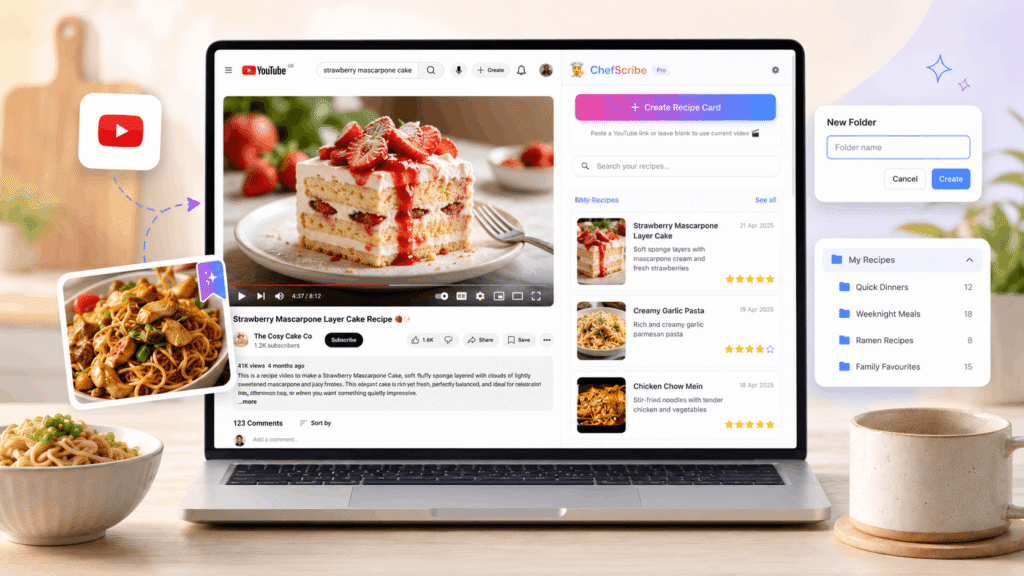
YouTube is brilliant for finding recipes, but it is not always the easiest place to save them, organise them, or cook from them later.
If you’re wondering how to save recipes from YouTube, this guide shows the main options: playlists, transcripts, screenshots, recipe-saving apps, and using ChefScribe to turn YouTube cooking videos into clean recipe cards.
Because here is the real problem: YouTube helps you save videos. It does not really help you save recipes.
If you have ever saved a cooking video to a playlist, taken screenshots of ingredients, or tried to find that one pasta recipe you watched three weeks ago, you already know how messy it can get.
The best way to save recipes from YouTube is to turn the video into a recipe card, so the ingredients, steps, servings and original video link are saved in one searchable place.
This guide explains what works, what does not, and how to build a searchable YouTube recipe library you can actually use.
You can also see the dedicated YouTube recipe converter page for how ChefScribe converts cooking videos into clear ingredients, steps and saved recipe cards.
Can you save recipes from YouTube?
Yes, you can save recipes from YouTube in a few different ways.
You can save the video to a playlist, copy the YouTube transcript, take screenshots, use a general recipe-saving app, or use a YouTube recipe extractor like ChefScribe to turn the cooking video into a clean recipe card.
The best method depends on what you want to do later.
If you only want to watch the video again, a playlist is enough. If you want the ingredients, method, servings, cooking time, and original video link in one place, a recipe card is much easier to use.
For a more step-by-step breakdown, see our guide on how to get a recipe from a YouTube video.
Why saving a YouTube video is not the same as saving a recipe
YouTube playlists feel like a solution at first.
You find a good cooking video, click Save, add it to a playlist called “Recipes to Try”, and move on.
Then three weeks later, you want to cook it.
You open the playlist, scroll through thumbnails, click the video, scrub through the timeline, try to find the ingredients, pause, rewind, check the description, and realise you have just spent ten minutes doing the exact thing you were trying to avoid.
The problem is simple:
A saved video is not a saved recipe.
It is only a link to a video that still needs work every time you want to cook from it.
Screenshots have the same problem. They can be useful in the moment, but they are hard to search, easy to lose, and not much help when you are standing in the supermarket trying to remember whether the recipe needed one clove of garlic or four.
What you actually need is the recipe itself: the ingredients, quantities, steps, servings, and notes saved somewhere you can search quickly.
If you have ever found yourself pausing, rewinding, and scrubbing through the same cooking video again and again, this is exactly why YouTube recipes are hard to follow while cooking.
Method 1: Save the video to a YouTube playlist
The easiest way to save a YouTube recipe is to add the video to a playlist.
This works well if you simply want to watch the video again. It is quick, free, and built into YouTube.
But playlists are not ideal for cooking.
A playlist does not show you the ingredients. It does not pull out the method. It does not tell you the cooking time. It does not let you search by ingredient. It also does not help if the recipe is buried halfway through a long video.
A playlist saves the inspiration, but not the usable recipe.
Method 2: Copy the YouTube transcript
Another option is to copy the YouTube transcript and turn it into recipe notes.
This can work, especially if the creator explains the recipe clearly. But transcripts are often messy. They may include repeated phrases, missing punctuation, timestamps, casual chat, brand mentions, or unclear ingredient amounts.
You still have to clean everything up yourself.
For one recipe, that might be fine. For a growing recipe collection, it becomes a chore very quickly.
If you want to understand this method in more detail, read how to turn a YouTube transcript into a recipe.
Method 3: Use screenshots or notes
Some people save YouTube recipes by taking screenshots of the video, copying bits into Notes, or keeping links in a document.
This is better than nothing, but it does not scale.
After a while, you end up with recipe screenshots in your camera roll, links in messages, notes with half-written ingredients, and videos saved in three different places.
That is how a recipe collection turns into a tiny digital junk drawer. We have all had one. Some of us have several. No judgement.
Method 4: Use ChefScribe to turn YouTube videos into recipe cards
The easiest way to save recipes from YouTube properly is to turn the video into a structured recipe card.
ChefScribe is a Chrome extension that extracts recipes from YouTube cooking videos and saves them into your recipe library.
When you find a YouTube recipe you want to keep, ChefScribe can turn it into a clean card with:
- Ingredients
- Quantities
- Step-by-step instructions
- Servings
- Estimated nutrition
- Cooking details
- A link back to the original YouTube video
Instead of saving another video link and hoping you can find the useful part later, you save the actual recipe in a format that is easier to cook from.
You can also read our guide to the best YouTube recipe extractor Chrome extension if you want to compare this approach with other ways of saving recipes.
How ChefScribe saves recipes from YouTube
When you find a YouTube cooking video you want to save, open the ChefScribe Chrome extension and extract the recipe.
ChefScribe turns the video into a structured recipe card, then saves it to your library.
From there, you can search it, rate it, organise it, print it, or open it again when you are ready to cook.
You can also paste a YouTube URL directly into ChefScribe, which is useful if someone sends you a recipe video or you find one while browsing and want to save it for later.
The saved recipe is not just a transcript. It is arranged like a proper recipe card, so you do not have to scroll through a wall of video text while your pan is already heating up.
👉 Add ChefScribe to Chrome — free
Build a YouTube recipe library
ChefScribe is not only a one-off YouTube recipe extractor. It also helps you build a searchable library of recipes saved from YouTube videos.
That means you can stop relying on messy playlists and start keeping your YouTube recipes in a format you can actually use.
A good YouTube recipe library should let you:
- Save recipes from YouTube videos
- Search by recipe name, ingredient, or keyword
- Keep the original video link
- Organise recipes into folders
- Rate recipes after cooking them
- Come back to favourites quickly
- Cook from a clear recipe card instead of a video timeline
You can also browse public recipe examples in the ChefScribe recipe library to see how YouTube recipes look once they have been turned into clean recipe cards.
This is the key difference.
YouTube is where you discover the recipe. ChefScribe is where you save and cook from it.
How to organise your YouTube recipe library
Once you have saved a few recipes, a simple folder system makes them much easier to find.
The goal is not to create a perfect filing system. The goal is to make something simple enough that you will actually keep using it.
Organise recipes by how you cook, not by how a cookbook would arrange them.
For example, you could organise by timing:
- Quick dinners
- Weekend cooking
- Batch cooking
Or by main ingredient:
- Chicken
- Pasta and noodles
- Vegetarian
- Fish
Or by status:
- Want to try
- Made and loved
- Good but needs tweaking
You do not need dozens of folders. Two or three useful folders are better than ten folders you ignore.
A simple system that works
Here is a realistic setup for someone who cooks from YouTube a few times a week:
Try This Week
Recipes you want to make soon. Keep this short, ideally five recipes or fewer.
Made and Loved
Recipes you have cooked and would happily make again.
Quick Weeknights
Recipes that are genuinely manageable on a normal evening.
Weekend Projects
Longer recipes, baking, slow cooking, or anything that needs more time.
That is enough for most people. It keeps your recipe library useful without turning it into another admin project.
Rate recipes after you cook them
If your recipe app lets you rate saved recipes, use that feature.
ChefScribe lets you rate saved recipes with stars, which becomes more useful over time.
After a few months, your top-rated recipes become your real personal cookbook: meals you have actually tried, liked, and would cook again.
That is much better than a giant playlist of videos you thought looked nice at midnight and never made.
Best way to save YouTube recipes
Here is the simple comparison:
| Method | Good for | Problem |
|---|---|---|
| YouTube playlist | Bookmarking videos | Does not save ingredients or steps |
| Screenshots | Quick reminders | Hard to search and organise |
| Transcript | Manual recipe copying | Messy and slow |
| General recipe app | Recipe storage | Not always built for YouTube videos |
| ChefScribe | Turning YouTube videos into recipe cards | Best fit for YouTube cooking videos |
If you only want to rewatch a video, a playlist is fine.
If you want to cook from the recipe, save it as a recipe card.
What happens if a YouTube video disappears?
YouTube videos can disappear. Creators delete videos, make them private, change channels, or remove old uploads.
If you only saved the YouTube link, the recipe can disappear with the video.
ChefScribe saves the extracted recipe text separately from the original YouTube video. That means your ingredients and steps stay in your library, even if the video is no longer available.
You still keep the original video link where possible, but your saved recipe does not rely entirely on the video staying online forever.
Can you print recipes saved from YouTube?
Yes. Once a YouTube recipe has been turned into a recipe card, it is much easier to print.
Instead of printing a messy transcript or trying to copy details from the video description, you can print the clean recipe card with the ingredients and method laid out properly.
For more detail, read our guide on how to print a recipe from a YouTube video.
Can you translate YouTube recipes into English?
Many great cooking videos are not in English, which can make saving and cooking from them harder.
ChefScribe can help turn a YouTube recipe into a clearer English recipe card, so you can follow the ingredients and steps more easily.
Read more here: How to translate a YouTube recipe into English.
Frequently asked questions
Is there an app to save recipes from YouTube?
Yes. ChefScribe is a Chrome extension that saves recipes from YouTube by turning cooking videos into structured recipe cards. It extracts the ingredients and steps, then stores the recipe in your personal library.
Can I save a YouTube cooking video as a recipe?
Yes. With ChefScribe, you can open a YouTube cooking video, click the extension, and convert the video into a recipe card with ingredients, steps, servings, and cooking details.
What is the best way to organise recipes from YouTube?
The best way is to save each recipe as a text-based recipe card, then organise those cards into a small number of useful folders. For example, you could use folders like Try This Week, Made and Loved, Quick Weeknights, and Weekend Projects.
How do I find a YouTube recipe I saved a while ago?
If you saved the video to a playlist, you will need to search or scroll through YouTube. If you saved the recipe with ChefScribe, you can search your library by recipe name, ingredient, or keyword.
Do saved recipes stay if the YouTube video is deleted?
With ChefScribe, the extracted recipe text is saved separately from the video. So even if the YouTube video is deleted or made private, your saved recipe card can remain in your library.
The short version
YouTube is a great place to find recipes, but it is not the best place to store them.
A playlist saves the video. A screenshot saves a moment. A transcript saves a mess.
A recipe card saves the actual recipe.
ChefScribe turns YouTube cooking videos into clean recipe cards and helps you build a searchable library of saved YouTube recipes.
👉 Start saving YouTube recipes with ChefScribe — free
